Serverless - Deploying Applications with AWS SAM
Overview
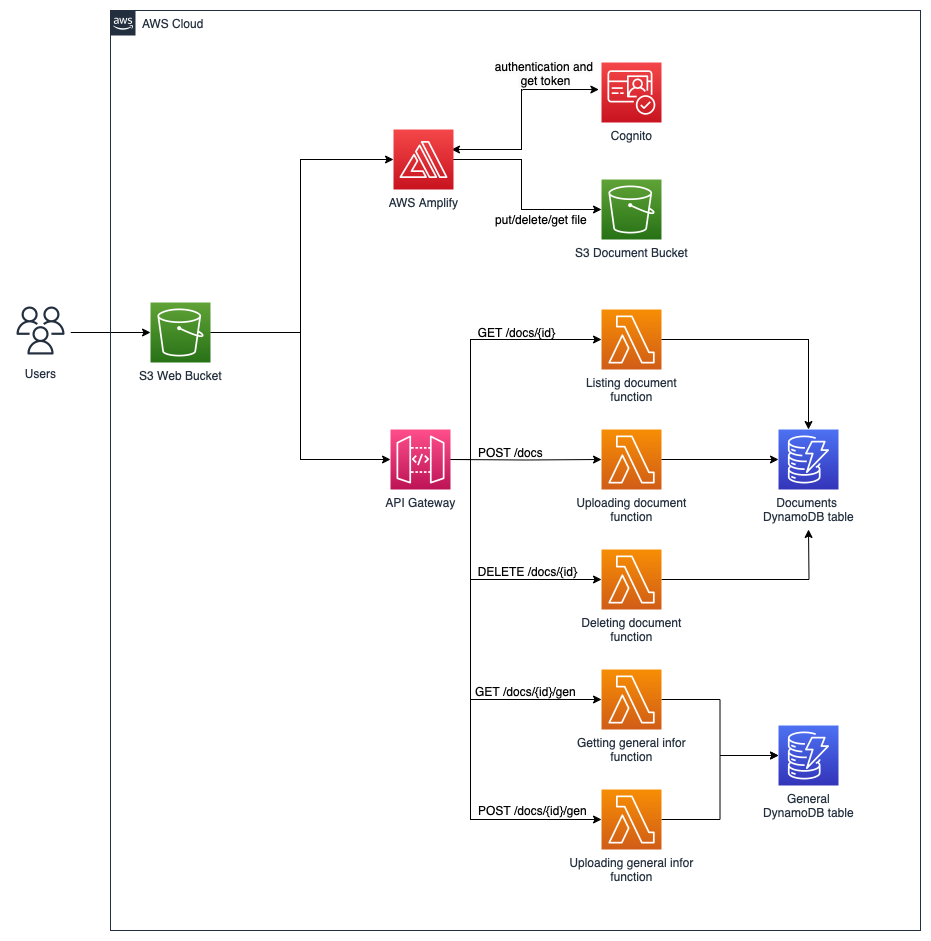
In workshop 133, workshop 134 and workshop 135, we built a serverless document management application with the AWS console and Amplify Gen 2. In this workshop, we will recreate the whole application (Amazon Cognito, two S3 buckets, a DynamoDB table, the Lambda functions and API Gateway) in a single fcajdms stack with the AWS Serverless Application Model (AWS SAM).
AWS SAM is an open-source framework for building serverless applications. SAM provides shorthand syntax to express functions, APIs, databases and event source mappings. With just a few lines per resource, you describe the application in YAML. During deployment, SAM transforms and expands the SAM syntax into AWS CloudFormation syntax, then CloudFormation creates the resources for you.
Complete the cleanup of workshop 135 before starting this workshop, because the SAM stack recreates the Documents table, the list_documents, upload_document, delete_document functions and the fcaj-dms-api API with the same names. Keep the FCAJ-Serverless-DMS folder on your computer (you edited Upload.jsx and constant.js in workshop 135). If you start with this workshop, download the project as described in part 1.2.
You need:
- AWS SAM CLI version 1.146.0 or later (supports the
python3.14runtime). - Python 3.14 on your computer to run
sam build. If you do not install Python 3.14, you can install Docker and runsam build --use-container. - AWS CLI configured with credentials and the
ap-southeast-1region (aws configure). - Node.js 22.12 or later to build the web application.
The architecture of the application we will build: